My AI lab
Small tools I build with AI for problems I keep meeting at home, in church and in client work. Here's why I made each one, and who it's for.
I also teach this, in keynotes for leaders and hands-on workshops for teams. Bring it to your team


Pesadithi: talk to your money, not a PDF
While researching How Kenyans Use AI at Nendo, I kept saying we should be able to talk to our money, not squint at lifeless PDF statements. Most of us already carry a year of evidence on our phones, one M-PESA SMS at a time. Pesadithi turns it into a story: when money lands, how fast it goes, and what borrowing and fees cost.
Who it's for
- Anyone who gets M-PESA SMSes and wonders where the month went
- Fuliza and mobile-loan users who want to see the real cost
- Couples, families and small traders planning a budget
It reads your SMSes or statement in your browser. Nothing is uploaded.
- No sign-up
- Never asks for your PIN
- Free
1It starts with the SMS you already have (invented example).
2A year in one line: 40 of 363 days ended owing Fuliza.
3The short version: three things that stand out.
4Half of a big payment is gone within 7.7 days.
Screens from the demo. Amani is fictional and the figures are invented.
Ebenezer: remember what you prayed for, and what God did
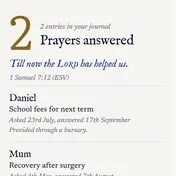
Journalling is part of how I pray each day, and I wanted to look back and see my walk with God, including answers I had long forgotten. The name comes from 1 Samuel 7:12, where Samuel sets up a stone and says, “Till now the Lord has helped us.” Ebenezer is that stone, kept in a journal.
Who it's for
- Anyone with a daily quiet time
- People who promise to pray for others
- Anyone new to prayer
- Saved on your device
- No account
- Download a copy any time
1Each day opens with a verse and a question to start you writing.
2Everyone you promised to pray for, and when you last did.
3The answers page: what you asked, when, and what God did.
Screens use Ebenezer's sample entries. The names are examples.
Crisis Comms GPT: rehearse the first hour of a crisis
Clients often ask Nendo to simulate how their legal, risk, communications and customer experience teams would respond to a crisis, because in the first hours a share price and a reputation can shift. This custom GPT, the Crisis Comms Rapid Response Team, puts that whole room around one scenario in minutes, so you take sharper questions to the real people.
Who it's for
- Heads of communications and corporate affairs
- Risk, legal and customer experience leads
- Agencies preparing a client for a drill
Free in ChatGPT. Use hypothetical details, not confidential ones. It sharpens your thinking; it doesn't replace your lawyers.
Illustrative. Pick a scenario to see each team's first move.
Written for this page to show the idea, not output from the GPT.
Bring this to your team
I can help your people build and use tools like these.
A keynote for leaders
What AI is changing in how people in Kenya and across Africa work, buy and decide.
A hands-on workshop
Your team leaves with a working tool for one of its own problems.
A crisis drill
Your leaders rehearse the first hour with the Crisis Comms GPT, guided by Nendo.
Builds and content partnerships
A tool or series built in public with your brand.
Meet Mshanga
A beaded bracelet in the colours of the Kenyan flag, with eyes, little feet and a lot of patience. Mshanga sits beside your ChatGPT chat box, keeps you company while it works and cheers when the job is done.
Drag it around, or tap it to say hello. Arrow keys work too.
See Mshanga in ChatGPT
How to set it up
- Open the adoption link in ChatGPT on the web and adopt Mshanga.
- Choose it in Settings, then Personalisation, then Pet.
- In the ChatGPT desktop app, type
/petand it floats beside your work.
Pets depend on your ChatGPT plan. It changes how ChatGPT looks, not how it answers.
Three more assistants, free in ChatGPT
Smaller tools my team and I built at Nendo.
Nendo PromptLab
Write clearer prompts when AI keeps giving you vague answers.
Open it in ChatGPTVideo and image AI detector
Weigh whether a picture or video was made with AI, and what to check next.
Open it in ChatGPTBrandwatch Boolean query assistant
Write and check Boolean searches for social listening in Brandwatch.
Open it in ChatGPT
What should I build next?
Tell me about a problem that keeps asking for a tool, or bring your team to learn to build its own.